Data Science
Token Limits: Why Your AI Chatbot Suddenly Forgets Everything
A deep dive into how token limits affect the performance of large language models and what you can do about it.
Part 3 of 4 in the "LLM & Tokenisation" series
You would have probably had this experience: you are deep into a long conversation with an AI assistant, and suddenly it seems to "forget" something you said earlier, or it flat-out refuses to process a huge document you pasted in. That's not the technical glitch or AI avoiding answers, it is because LLM has hit its token limit.
In the article Tokens 101: The Secret Language Your AI Actually Speaks and Inside the Tokeniser: BPE, WordPiece, SentencePiece & Unigram Explained, we covered what tokens are and how they are created. Now let's talk about the ceiling every LLM bumps up against.
What Is a Token Limit?
Every LLM has a fixed amount of "processing capacity" it can work with at once. This capacity is measured in tokens, and it's usually split into two numbers:
- Input token limit: The maximum number of tokens the model can accept as your prompt (your question, your pasted document, your chat history, etc.).
- Output token limit: The maximum number of tokens the model can generate in its response.
If the input is bigger than the input token limit, then the model literally cannot process all of it, thereby something has to be cut, truncated, or rejected. from the input.
The Regression Model Analogy (This Will Make It Click)
Here's a simple comparison for anyone who has dabbled in basic statistics or data science:
Imagine you built a regression model designed to accept exactly 6 input variables. Now imagine try to feed it a dataset with 14 variables. What happens? The model doesn't stretch itself to fit, it simply can't run, or it forces to drop 8 variables first.
An LLM's token limit works the same way. If a model has an input limit of, say, 10 tokens, and the input sentence breaks down into 20 tokens, the model cannot accept full sentence in one go. Just like the regression model needs a fixed number of variables, the LLM needs the input to fit inside a fixed number of tokens.
| Regression Model | LLM |
|---|---|
| Accepts exactly 6 variables | Accepts up to N input tokens |
| 14 variables won't fit, model can't run | 20 tokens won't fit into a 10-token limit, request gets truncated/rejected |
| You must drop or combine variables | You must shorten your prompt or split it into chunks |
Input vs. Output Token Limit — Why Does Both Matter
It is easy to think of "token limit" as one single number, but input and output limits often behave and get sized differently.
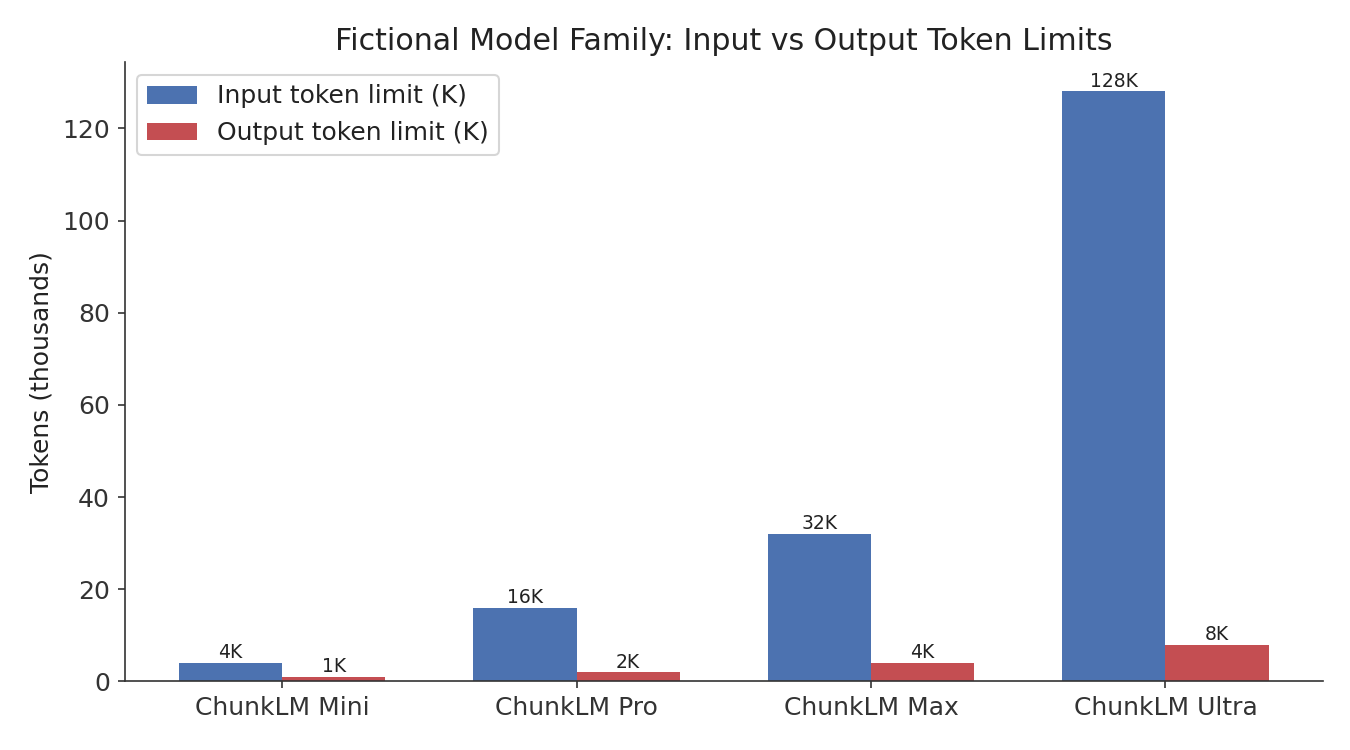 This chart shows 4 fictional models - ChunkLM Mini, Pro, Max, and Ultra, with their input and output token limits in thousands of tokens. Notice that input limits (blue) tend to be set much higher than output limits (red). This is common in real LLM families: they can read a lot more than they're typically allowed to write in one go.
- Blue bars = maximum input tokens; red bars = maximum output tokens.
- As you move from "Mini" to "Ultra," both limits grow, but input limits grow faster, larger models are often optimized to read huge documents even if they still generate relatively focused, shorter answers.
What Actually Happens When You Exceed the Limit?
Depending on the platform, exceeding a token limit typically leads to one of these outcomes:
- Hard rejection: The system tells the input is too long and refuses to process it.
- Silent truncation: Older or earlier parts of your input get cut off without clear warning.
- Forced summarization: Some chat interfaces automatically compress earlier conversation history into a summary to make room for new tokens.
This is also exactly why a chatbot can seem to "forget" something you said 40 messages ago, if entire conversation history no longer fits inside the token limit, the oldest parts are the first to go.
Practical Example: When a Product Catalog Is Too Big to Summarize in One Shot
Imagine a fictional home-goods retailer, NestNook, that wants to use an LLM to auto-generate SEO descriptions for its entire furniture catalog by pasting the whole catalog into one prompt.
- The catalog has 500 products, each with a name, dimensions, materials, and price, roughly 25,000 tokens once tokenized.
- NestNook's chosen model has an input limit of 8,000 tokens.
Just like trying to jam 14 variables into a 6-variable regression model, NestNook's full catalog simply won't fit. Their engineering team solves it the same way a data scientist would handle too many variables: they batch the catalog into smaller chunks, let's say 60 products per prompt, so each request comfortably fits under the token limit.
Practical Example: Output Limits and Customer Emails
A fictional subscription box company, CrateCraze, uses an LLM to auto-draft personalized "why we picked this for you" emails. Their model has a generous input limit but a modest output limit of 500 tokens per response.
When a support agent asks the model to write a "detailed 1,500-word explanation" for a customer, the model simply can't comply in one response as the output limit caps it well below that word count. CrateCraze's team learned to ask for shorter, punchier drafts (matching the output limit) rather than requesting sprawling essays the model can't fully deliver in one go.
Key Takeaways
- Every LLM has an input token limit and an output token limit, separate ceilings for what it can read and what it can write.
- Think of it like a regression model with a fixed number of variable "slots", if the input doesn't fit, something has to give.
- Exceeding the limit leads to rejection, truncation, or automatic summarization, depending on the platform.
- Real-world teams handle this by batching large inputs and right-sizing requested output length.
- Token limits are the hidden ceiling behind why long conversations seem to lose earlier context.
**Up next in the last article i.e. in Part 4: We zoom out from single messages to entire conversations with context windows how much an LLM can "remember" at once, and what that means for real-world products.
In case of any queries or feedback feel free to drop comments or reach out using the Contact secion.