Analytics
What is Open Graph and How Does It Work?
A simple introduction to Open Graph protocol and its role in social media sharing.
What is Open Graph? A practical guide for anyone who shares links
Paste a link into WhatsApp or Facebook and wait a second. Most of the time, a little card pops up: a headline, a photo, maybe a line of description. Sometimes, though, you get nothing but the raw, blue URL sitting there like a typo.
That difference comes down to a handful of lines of code most people never see: Open Graph tags. If you write content, run a website, or care about how your links look when they land in someone's feed, it's worth knowing how they work. This guide walks through what Open Graph is, why it exists, how to add it to a page, and where people usually trip up.
What Open Graph actually is ?
Open Graph is a protocol Facebook introduced back in 2010 to give web pages a standard way to describe themselves. Before it existed, every social platform had its own guesswork for figuring out what a shared link was about, sometimes grabbing a random image from the page, sometimes just the page title, sometimes nothing useful at all.
Open Graph fixed that by giving developers a small, predictable set of <meta> tags to drop into the <head> of a page. Those tags tell any platform reading the page: here's the title, here's the image to use, here's what type of content this is, here's the canonical URL. WhatsApp, Facebook, LinkedIn, Slack, Discord, and most other platforms now read these same tags, so it's become the closest thing the web has to a shared standard for link previews.
Why it's needed ?
We share content constantly, in WhatsApp groups, on Facebook, in Slack channels, or over email. Without Open Graph, a shared link is just text: a URL and whatever platform-guessed scraps come with it. With Open Graph, the same link turns into a small, image-backed card that gives the reader a reason to tap.
That matters for click-through rate. A plain link asks for trust before the reader knows anything about where it goes. A card with a relevant image and a clear headline gives them something to react to before they click. The image below shows the same URL shared with and without Open Graph tags in place, so you can see the gap side by side.
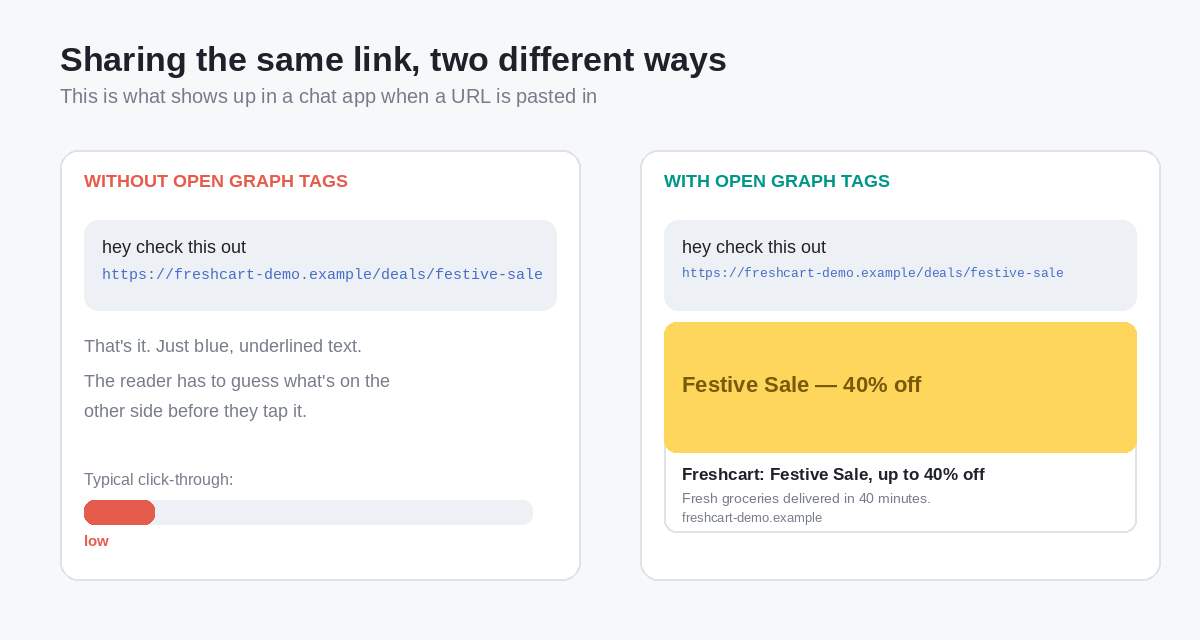 Same link, same message, the only difference is whether the page has Open Graph tags for the platform to read.
What happens if the tags are missing
Nothing breaks and not even mandatory. That's the honest answer. Most platforms fall back to scraping the page directly grabbing the <title> tag, maybe the first image they find, maybe nothing at all. The link still works, and clicking it still takes people to the right place.
What you lose is control and consistency. Without Open Graph tags, you are at the mercy of whatever a crawler decides is worth showing, and that can mean a blurry logo, a random product photo, or a stray line of navigation text passed off as your headline. You also lose out on higher engagement, since a raw link generally gets fewer clicks and shares than a card that actually looks like something.
How Open Graph tags actually work
When someone shares a URL, the receiving platform doesn't render the page like a browser would. It sends its own crawler to fetch the HTML, scan the <head> section for og: tags, and use whatever it finds to build the preview card. That whole trip happens in the background, usually in under a second.
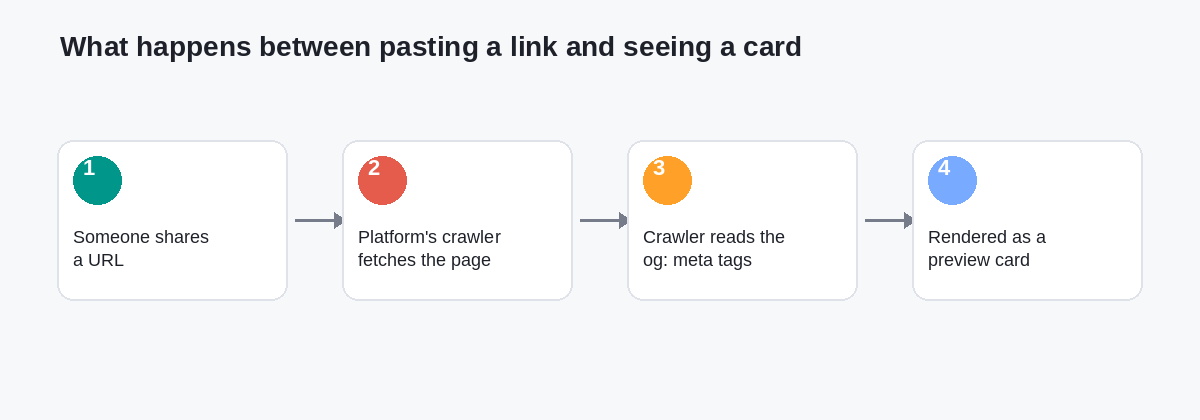 From paste to preview: this round trip happens every time a link gets shared, not just the first time.
The core tags
Four tags cover almost every use case:
| Tag | What it does | Example value |
|---|---|---|
og:title | The headline shown on the card | "Freshcart Festive Sale" |
og:type | What kind of content the page is | "website", "article", "video.other" |
og:image | The image used on the preview card | "https://freshcart.example/og/sale.jpg" |
og:url | The canonical URL for the page | "https://freshcart.example/deals/festive-sale" |
A fifth, og:description, isn't strictly required but is worth adding, it fills in the line of text under the headline instead of leaving it blank or auto-generated.
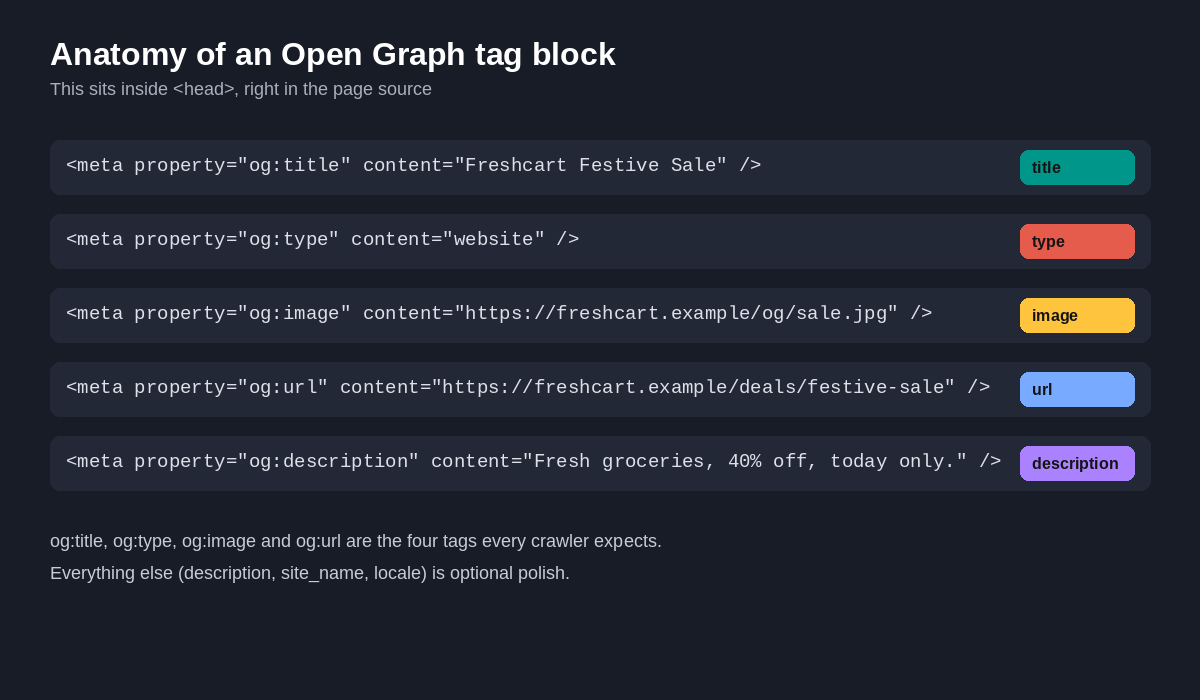 This is what the tags look like sitting in a page's
 <head>. Right-click any page and choose "View Page Source" to see your own.
Generating the tags
You don't need to memorize the syntax. Tools like SmallSEOTools' Open Graph generator, Meta Tags by metatags.io, or opengraph.xyz let you fill in a form, title, description, image URL, site name and spit out ready-to-paste HTML. That's often the fastest way to get started, especially if you're adding tags to a page manually rather than through a CMS plugin.
Here's a minimal, working example for a fictional grocery delivery site:
<meta property="og:title"
content="Freshcart: Festive Sale, up to 40% off" />

<meta property="og:type"
content="website" />

<meta property="og:image"
content="https://freshcart.example/og/festive-sale.jpg" />

<meta property="og:url"
content="https://freshcart.example/deals/festive-sale" />

<meta property="og:description"
content="Fresh groceries delivered in 40 minutes. Festive Sale ends midnight Sunday." />

<meta property="og:site_name"
content="Freshcart" />
Drop the above inside <head>, and any platform that reads Open Graph tags now has everything it needs to build a preview card.
Different types of Open Graph tags
The og:type tag is what decides which additional tags make sense for a page. A blog post and a product page aren't the same kind of content, so Open Graph gives you type-specific tags on top of the four basics.
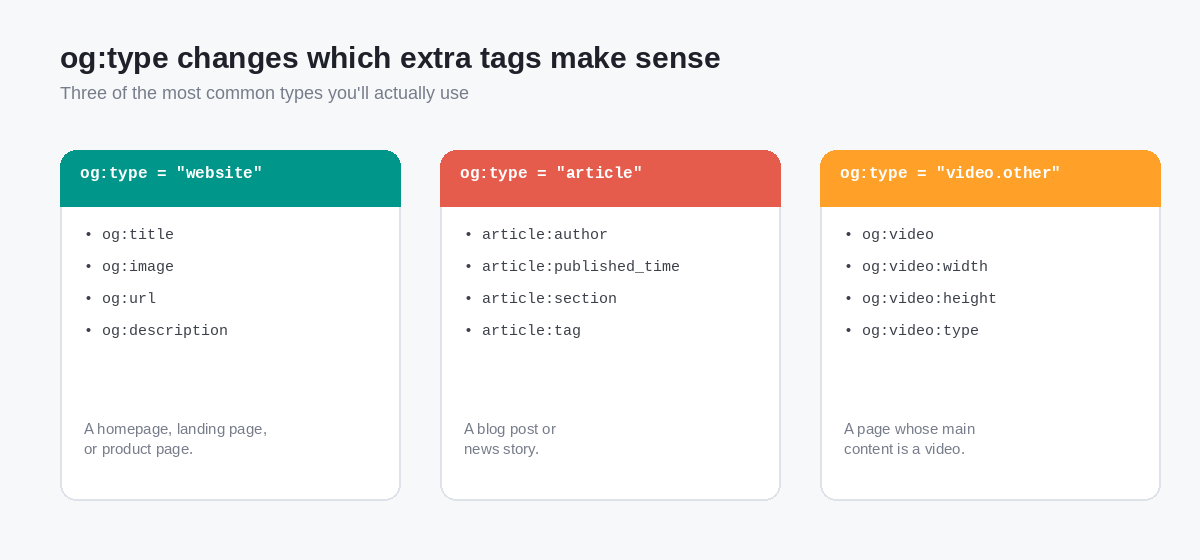 Pick the type that matches what the page actually is it unlocks the right extra fields.
- website: The default, general-purpose type. Fine for homepages, landing pages, and most product pages.
- article: Meant for blog posts and news content. Adds tags like
article:author,article:published_time,article:section, andarticle:tag, which some platforms use to show a byline or publish date on the card. - video.other (and its siblings like
video.movie,video.episode): For pages where a video is the main content. Addsog:video,og:video:width,og:video:height, andog:video:typeso the platform can potentially play the video inline instead of just linking out.
Here's what a full tag block looks like for an article page, as you'd find it in the page source:
<meta property="og:title"
content="5 Ways to Reduce Cart Abandonment" />

<meta property="og:type"
content="article" />

<meta property="og:image"
content="https://freshcart.example/blog/cart-abandonment.jpg" />

<meta property="og:url"
content="https://freshcart.example/blog/reduce-cart-abandonment" />

<meta property="article:author"
content="https://freshcart.example/authors/priya-menon" />

<meta property="article:published_time"
content="2026-03-14T09:00:00+05:30" />

<meta property="article:section"
content="E-commerce Tips" />
Open Graph vs. Twitter Cards: a quick comparison
Open Graph is common but not the only game in town. X (formerly Twitter) has its own tag set, called Twitter Cards, and the two are frequently confused since they solve the same problem in slightly different ways.
| Open Graph | Twitter Cards | |
|---|---|---|
| Created by | Facebook (2010) | Twitter (2012) |
| Tag prefix | og: | twitter: |
| Used by | Facebook, WhatsApp, LinkedIn, Slack, Discord, and most others | Primarily X/Twitter |
| Minimum tags | og:title, og:type, og:image, og:url | twitter:card, twitter:title, twitter:image |
| Fallback behavior | If missing, most platforms scrape the page | X falls back to Open Graph tags if Twitter-specific ones are absent |
That last row is the useful part: X will read your Open Graph tags if you haven't bothered adding Twitter-specific ones. So the safest, lowest-effort setup is to add solid Open Graph tags first, and only layer in twitter:card and friends if you want finer control over how things look specifically on X.
Four examples of Open Graph in practice
Here's how the same set of tags plays out differently depending on the kind of site running them.
E-commerce - Freshcart (grocery delivery, fictional). A product page for a festive sale sets og:type to website, og:image to a bright banner showing the discount, and og:title to the offer itself rather than a generic "Freshcart | Home". Shared in a family WhatsApp group, the card shows the discount and the delivery time up front, which is a stronger pitch than a plain link.
Healthcare - Wellpath Clinics (telehealth booking, fictional). An appointment-booking page uses og:type: website and a calm, professional og:image no stock photo of a stethoscope, just a clean graphic with the clinic's name and "Book a video consult in 5 minutes." When a patient forwards the link to a family member, the card reassures them it's a legitimate booking page rather than a bare, unfamiliar URL.
Finance - Ledgerly (budgeting app, fictional). A blog post titled "Why Envelope Budgeting Still Works" sets og:type to article, adds article:published_time so the card can show it's recent, and uses a custom og:image with the article's key chart baked in. Shared in a personal-finance subreddit or forum, the preview card does double duty as a mini-teaser of the content.
Media - StreamNook (video platform, fictional). A page for a recorded webinar sets og:type to video.other, along with og:video, og:video:width, and og:video:height. On platforms that support inline video previews, the webinar can start playing right from the shared card, without the viewer ever leaving their feed.
How to check your own tags
You don't need to guess whether your tags are working. A few reliable ways to check:
- View source. Right-click any page, choose "View Page Source," and search for
og:to see what is already there. - Use a debugger. Facebook's Sharing Debugger and LinkedIn's Post Inspector both fetch a URL the way their crawlers would and show you exactly what card will render useful for catching a broken image path or a missing tag.
- Share it to yourself. Paste the link into a WhatsApp chat with yourself, or a private Slack channel. It's a low-effort sanity check before pushing anything live.
Concepts covered in this article
- Open Graph is a set of
og:meta tags, originally from Facebook, that tells platforms how to build a preview card for a shared link. - Without it, links still work and you just lose control over the image, title, and description shown, and usually see a lower click-through rate.
- The four essential tags are
og:title,og:type,og:image, andog:url.og:descriptionis a strong fifth addition. og:typedetermines which extra tags apply:websitefor general pages,articlefor blog and news content,video.otherfor video-first pages.- X/Twitter reads Open Graph tags as a fallback, so setting these up covers most platforms with one pass of work.
- Debugger tools from Facebook and LinkedIn are the fastest way to confirm your tags actually render the way you expect.
Once these are in place, the payoff is quiet but real: every link you share, in every group chat and every feed, does a little more work for you. It builds confidence in your customers or viewers.
Your customers or viewers are most likely to click the link when they have an idea what it does contains. It also build confidence in minds of users to avoid clicking on spam links as the spam links is just a plain URL with no preview sent with the aim of cheating navie users. From this security context, OG tags become both necessity and promotional feature.
In case of any queries or feedback feel free to drop comments or reach out using the Contact secion.